There are times where administrators and/or executives/managers want to alert users opening a given record about something important on a given record. If people need to be warned that they shouldn't call the contact because they are marked as "Do Not Call" or an Account is marked as being "On Hold". Those can typically be done through alerts. But if logic is needed off of related objects, such as only allowing 3 items per Order, or if a number of Cases have been opened within a given period of time, that's not as easy to do with JScript.
That means that you would need to take your logic to a webpage on the load of the given entity. But since you are opening another web page (through the window.open method) users would be able to click around it and ignore it, making the work of the web page useless.
If you use the window.showModalDialog method then you can change all that. A Modal Dialog requires users to take action on the newly opened window before they can get to the record they are trying to open. The method is very similar to the window.open method, allowing you to control the size of the page, what bars show (status, menu, etc) on the web page. Here's the code:
if(crmForm.ObjectId != null)
{
var url = "/ISV/Test/OrderDetailCheck.aspx?id=" + crmForm.ObjectId;
//window.open(url);
window.showModalDialog(url, "Order Detail Check","dialogWidth:200px;dialogHeight:150px;center:yes;status:no");
}
Just put this in the OnLoad of your entity and you now have a custom page that you can fully customize, modify and design that users must look at take action on before they can access a record.
David Fronk
Dynamic Methods Inc.
Friday, May 01, 2009


Friday, April 24, 2009
Shared Variable in JScript
An occasion came up where the value of a field needed to be masked but still allow the correct value to be saved to the database. Envision sensitive information like social security numbers, credit card numbers, etc. These are things that data entry people need to enter but not necessarily see the entire number after they enter it.
You could use another field to house the real information and hide that field on the form so no one can see it, but then you run the risk of having that information in another place unnecessarily. Also, if someone is going to this length to make sure users can't see this information they probably want to make sure that the data gets encrypted in the database so that users couldn't get the information from the grid any way.
So, to keep this more hidden and more secure you actually can use a variable between your methods on the same document. It's actually really easy, here's how:
In the OnLoad of the form write:
document.newvariable = 5;
Now in your OnChange or OnSave you can reference that variable the same way.
crmForm.all.new_securefield.DataValue = document.newvariable;
So, if you wanted to mask something:
In the OnLoad:
document.originalvalue = crmForm.all.new_securefield.DataValue;
crmForm.all.new_securefield.DataValue = "xxxxxxxx" + crmForm.all.new_securefield.DataValue.SubString(8, crmForm.all.new_securefield.DataValue.Length - 8);
And now in the OnSave:
//Hide the field so the real value doesn't appear just before the save
crmForm.all.new_securefield.style.visibility = 'hidden';
crmForm.all.new_securefield.DataValue = document.newvariable;
Simple but effective for keeping data secure on the form. I'm sure there are many more uses for global variables like this, this is just one way that it can be implemented.
David Fronk
Dynamic Methods Inc.
You could use another field to house the real information and hide that field on the form so no one can see it, but then you run the risk of having that information in another place unnecessarily. Also, if someone is going to this length to make sure users can't see this information they probably want to make sure that the data gets encrypted in the database so that users couldn't get the information from the grid any way.
So, to keep this more hidden and more secure you actually can use a variable between your methods on the same document. It's actually really easy, here's how:
In the OnLoad of the form write:
document.newvariable = 5;
Now in your OnChange or OnSave you can reference that variable the same way.
crmForm.all.new_securefield.DataValue = document.newvariable;
So, if you wanted to mask something:
In the OnLoad:
document.originalvalue = crmForm.all.new_securefield.DataValue;
crmForm.all.new_securefield.DataValue = "xxxxxxxx" + crmForm.all.new_securefield.DataValue.SubString(8, crmForm.all.new_securefield.DataValue.Length - 8);
And now in the OnSave:
//Hide the field so the real value doesn't appear just before the save
crmForm.all.new_securefield.style.visibility = 'hidden';
crmForm.all.new_securefield.DataValue = document.newvariable;
Simple but effective for keeping data secure on the form. I'm sure there are many more uses for global variables like this, this is just one way that it can be implemented.
David Fronk
Dynamic Methods Inc.
Thursday, April 16, 2009
Microsoft CRM Developer Toolkit
I'm probably late in getting this up but the MSCRM Developer Toolkit is now available at the following link:
http://code.msdn.microsoft.com/E2DevTkt
Be aware that you must be running Visual Studio 2008 and CRM 4.0 in order for this to work. Here are the highlights of what the toolkit offers from within Visual Studio:
1. View All CRM Entities - Displays a listing of CRM entities that are dynamically available from the CRM Explorer within Visual Studio 2008
2. Create and Update CRM Entities - Allows for creating new entities and updating existing entities from within the CRM Explorer experience
3. Create a Wrapper Class - Provides the ability to auto-generate wrapper classes for entities, which exposes the CRM entities and their corresponding attributes as classes and properties respectively to enable development of code to interact with the entities
4. Generate Plug-in Code - Enumerates the available Plug-ins for an entity and generates the code necessary to jumpstart the plug-in development process
5. Integrate the Build and Deploy Process - Simplifies the process of building and deploying a CRM solution
6. Deploy Across Multiple Servers - Assists in deployment and maintenance of Windows installer packages across multiple environments
Please be aware that in their documentation they actually do come out and say that this tool is UNSUPPORTED and is provided, AS IS. Not exactly sure why they would include that since this is put out by Microsoft but there you go. Use at your own risk.
David Fronk
Dynamic Methods Inc.
http://code.msdn.microsoft.com/E2DevTkt
Be aware that you must be running Visual Studio 2008 and CRM 4.0 in order for this to work. Here are the highlights of what the toolkit offers from within Visual Studio:
1. View All CRM Entities - Displays a listing of CRM entities that are dynamically available from the CRM Explorer within Visual Studio 2008
2. Create and Update CRM Entities - Allows for creating new entities and updating existing entities from within the CRM Explorer experience
3. Create a Wrapper Class - Provides the ability to auto-generate wrapper classes for entities, which exposes the CRM entities and their corresponding attributes as classes and properties respectively to enable development of code to interact with the entities
4. Generate Plug-in Code - Enumerates the available Plug-ins for an entity and generates the code necessary to jumpstart the plug-in development process
5. Integrate the Build and Deploy Process - Simplifies the process of building and deploying a CRM solution
6. Deploy Across Multiple Servers - Assists in deployment and maintenance of Windows installer packages across multiple environments
Please be aware that in their documentation they actually do come out and say that this tool is UNSUPPORTED and is provided, AS IS. Not exactly sure why they would include that since this is put out by Microsoft but there you go. Use at your own risk.
David Fronk
Dynamic Methods Inc.
Monday, April 13, 2009
Changing Default SQL Port
In order to keep data more secure requests have come in to have SQL run on a different port. This helps to avoid typical SQL port scans and keep your database off of the "easy to target" list. Changing the database and having CRM work after the change is actually pretty simple.
Please note that this configuration change requires modifying of the registry and updating the MSCRM_Config database. Both of these actions are NOT SUPPORTED by MS Support. So, perform at your own risk.
Here's how it works:
1.Open SQL Server Configuration Manager

2. Choose your instance of SQL that you want to change the port on and open the "TCP/IP" Property.

3. A new window will open.
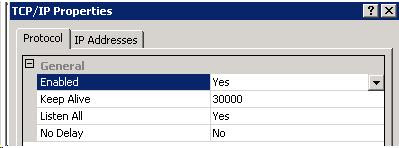
4. Click on the "IP Addresses" tab and scroll to the bottom. Under the "IPAll" section change the "TCP Port" to the port desired. Click Ok.

You will be told that the changes will not take effect until SQL services have been restarted. Restart the Services and you are all set for this step.
Next you will need to change three keys in the MSCRM hive of the registry on the CRM server:
1. configdb
2. database
3. metabase
Each of these keys will have a "Data Source" switch that has the name of the SQL server as the Data Source. In order to tell the connection to use the specified port you will need to add a comma "," and then the port. For example:
Provider=SQLOLEDB;Data Source=SQLSERVER,1234;Initial Catalog=CompanyName_MSCRM;Integrated Security=SSPI
Lastly, you will need to update the Organization table of the MSCRM_Config DB. Just like you updated the registry keys previously, the same thing will need to be done to the "ConnectionString" column of the Organization table. Run the following SQL scripts:
SELECT ConnectionString, Id from Organization
This will give you the current connection string being used. Copy and paste the value into your query page. Add the comma "," to the Data Source and then update the table.
UPDATE Organization
SET ConnectionString = 'Provider=SQLOLEDB;Data Source=SQLSERVER,1234;Initial Catalog=CompanyName_MSCRM;Integrated Security=SSPI'
where Id = '(put in the Organization Id from your select that you ran previously)'
And now, as long as your Window's Firewall is set up to allow traffic over the newly chosen port, you're all set. Watch out for those firewall rules as they can make a perfectly implemented configuration change all for not.
Enjoy your newly secured solution!
David Fronk
Dynamic Methods Inc.
Friday, April 03, 2009
Case Sensitive Searches in CRM
There have been a few instances that have come up where customers have requested the ability to make a certain field case sensitive. Typically this is for key fields, like foreign keys. But since the MSCRM database table collation is typically not set up for case sensitivity you don't get the option.
You can however set the collation at the column level and make just the field you want case sensitive.
Here are the steps:
1. Open Microsoft SQL Server Management Studio
2. Expand the <OrganizationName>_MSCRM
3. Pick the table you want (for example dbo.AccountBase) and expand the table
4. Expand the Columns folder
5. Right click on the column you want to set as being case sensitive
6. Choose Modify
7. In the right window panes make sure the field you want to change is highlighted
8. In the bottom pane of the right window (Column Properties) find the "Collation" property and click on the elipses in the right hand column to edit the property.
9. A new window will come up and you will see a checkbox for "Case Sensitive", check that box.
10. Click OK
11. Restart the SQL services
12. Just to be safe restart IIS
Now you're all set with a new case sensitive field.
Also, just to add the disclaimer. THIS IS NOT SUPPORTED by MS Support, so apply at your own risk. You have been warned. I have yet to see any issue arise from this, but my job is to make you aware.
David Fronk
Dynamic Methods Inc.
You can however set the collation at the column level and make just the field you want case sensitive.
Here are the steps:
1. Open Microsoft SQL Server Management Studio
2. Expand the <OrganizationName>_MSCRM
3. Pick the table you want (for example dbo.AccountBase) and expand the table
4. Expand the Columns folder
5. Right click on the column you want to set as being case sensitive
6. Choose Modify
7. In the right window panes make sure the field you want to change is highlighted
8. In the bottom pane of the right window (Column Properties) find the "Collation" property and click on the elipses in the right hand column to edit the property.
9. A new window will come up and you will see a checkbox for "Case Sensitive", check that box.
10. Click OK
11. Restart the SQL services
12. Just to be safe restart IIS
Now you're all set with a new case sensitive field.
Also, just to add the disclaimer. THIS IS NOT SUPPORTED by MS Support, so apply at your own risk. You have been warned. I have yet to see any issue arise from this, but my job is to make you aware.
David Fronk
Dynamic Methods Inc.
Friday, March 27, 2009
Viewing "Customizations" Area while Outlook Client is Open
I made mention to one of the Microsoft CRM Product Managers that the fact that I cannot access "Customizations" from the Outlook client, or the Web client when I have Outlook open seems silly to me. When the Outlook client first came out it was titled "The Sales for Outlook Client" and with that title not including "Customizations" made sense. But now the client has moved far from that title and this really shouldn't be an issue for end users.
The Product Manager looked at me in a confused way and said, "Why don't you just update the Site Map?" I couldn't believe that something so simple could solve my problem. Previously I've had users go to a separate URL, like the IP address, or I would set up another host header to work around this. But I tried this and this way is much better.
All you have to do is export the Site Map and find the XML tag "nav_syscust" under the "Settings" area tag and add:
Client = "All"
Save, import, publish and you're all set. Here's the full line:
<SubArea Id="nav_syscust" ResourceId="Homepage_SystemCustomization" Icon="/_imgs/area/18_syscust.gif" Url="/tools/systemcustomization/systemcustomization.aspx" Client="All" />
Enjoy,
David Fronk
Dynamic Methods Inc.
The Product Manager looked at me in a confused way and said, "Why don't you just update the Site Map?" I couldn't believe that something so simple could solve my problem. Previously I've had users go to a separate URL, like the IP address, or I would set up another host header to work around this. But I tried this and this way is much better.
All you have to do is export the Site Map and find the XML tag "nav_syscust" under the "Settings" area tag and add:
Client = "All"
Save, import, publish and you're all set. Here's the full line:
<SubArea Id="nav_syscust" ResourceId="Homepage_SystemCustomization" Icon="/_imgs/area/18_syscust.gif" Url="/tools/systemcustomization/systemcustomization.aspx" Client="All" />
Enjoy,
David Fronk
Dynamic Methods Inc.
Tuesday, March 17, 2009
Convergence Summary
Convergence this year was held in the New Orleans Conference Center, which is rather large. Here's what Wikipedia has to say about it:
The New Orleans Morial Convention Center (formerly the Ernest N. Morial Convention Center) is convention center in New Orleans, Louisiana, United States. The lower end of building one is located 1,640 feet (500 m) upriver from Canal Street on the banks of the Mississippi River. It is named after former Mayor of New Orleans Ernest N. Morial. As of 2006, it has about 1.1 million square feet (102,000 m²) of exhibit space, covering almost 11 blocks, and over 3 million square feet (280,000 m²) of total space. The front of the main building is 1 kilometer long (for full article click here).
Microsoft had about two thirds of the Convention Center rented out so running from classes on one end of the first floor to the other end of the third floor took a fair amount of time to walk to.
I was able to sit in on a lot of user experience sessions with the Dynamics CRM team to discuss their thoughts on the future for the product. Unfortunately I am sworn to secrecy (signed NDA) about anything that was discussed but I did ask if I could share one or two specific things. Since anything and everything could still be changed there wouldn't be much point in me sharing much anyway. However, I can share that the team has heard the cries from the community and is working very hard to add functionality and improve other existing items. One of the specific things that the Outlook team is focusing on is increasing the RELIABILITY and STABILITY of the Outlook client. All of the issues that were mentioned the team had full knowledge of and was working on getting those things resolved. I must say that after sitting through those sessions (where the product team was raked over the coals) they were very coridial, professional, and understanding. One of the biggest things that I got out of these sessions was that I will submit my errors to Microsoft much more often now because I know there really are people reading them on the other end, I've met them and shook their hands.
That all being said, I'm going to try to bullet point out everything to make this a bit more readable/scannable for those just looking for highlights. So, here it goes. These are some of the highlights that I picked up from the show (not in any particular order):
1. If you haven't seen any of the CRM Accelerators, go check them out at codeplex.com
2. SQL 2010 is going to have a lot of great new enhancements one of which will be managing multi-terrabyte systems quickly
3. Performance Point will become a part of SQL and SharePoint (most likely pieces will go to each, with either minimal or no overlap between the two systems)
4. Microsoft's CRM to GP integration - great for out of the box integrations, any additional fields will have to be added by someone with "developer" type skills. Plugins and triggers will most likely have to be written. Interface looks clean but the extensibility doesn't appear to be as strong.
5. If you went to Convergence and do not own CRM you can sign up for CRM Online for $9.99/user for up to 20 users for 6 months. That's a steal.
6. CRM Developer Toolkit (available in April) - Visual Studio add-on. Looks solid, makes developing much easier by being able to see all objects, fields, etc within Visual Studio. This is code complete and documentation is all that is really being completed.
7. Don't look at MSCRM just as a CRM solution but an xRM solution. It's extensibility really makes it so that customers don't have to be your center, you can have whatever you want as the center of your Relationship Management system you want.
8. Newsfeed Accelerator - use workflow to augment your user's daily actions to further the data that is put into the system. Use a user's actions and workflow to populate you system to give a more full 360 degree view of what is going on in your CRM system and with the relationships between what you track in your system.
I don't do the show justice as there was a lot learned and gained from attending. For those in the Southern California Area, keep your eyes open for the Dynamic Methods Convergence (Titled "DM Convergence") where we will be putting on a similar but very focused event focusing on things from this year's Convergence specifically for Dynamics GP and CRM where we will have classes and give people the ability to "Ask the Experts" just about anything they want so we can help everyone along in whatever stage or scenario they are in. With Convergence having just finished we are looking into what content we want to present as well as when we will be holding it. Most likely we will be holding the event in May, so keep stay tuned for updates.
Also, this is specifically targeted at Southern California Dynamics GP and CRM users but that doesn't mean you can't come. If you're really interested stay tuned as I should be posting a method of registration or contact in the near future. We typically just have a 1 day event so the travel doesn't always justify the attendance.
David Fronk
Dynamic Methods
The New Orleans Morial Convention Center (formerly the Ernest N. Morial Convention Center) is convention center in New Orleans, Louisiana, United States. The lower end of building one is located 1,640 feet (500 m) upriver from Canal Street on the banks of the Mississippi River. It is named after former Mayor of New Orleans Ernest N. Morial. As of 2006, it has about 1.1 million square feet (102,000 m²) of exhibit space, covering almost 11 blocks, and over 3 million square feet (280,000 m²) of total space. The front of the main building is 1 kilometer long (for full article click here).
Microsoft had about two thirds of the Convention Center rented out so running from classes on one end of the first floor to the other end of the third floor took a fair amount of time to walk to.
I was able to sit in on a lot of user experience sessions with the Dynamics CRM team to discuss their thoughts on the future for the product. Unfortunately I am sworn to secrecy (signed NDA) about anything that was discussed but I did ask if I could share one or two specific things. Since anything and everything could still be changed there wouldn't be much point in me sharing much anyway. However, I can share that the team has heard the cries from the community and is working very hard to add functionality and improve other existing items. One of the specific things that the Outlook team is focusing on is increasing the RELIABILITY and STABILITY of the Outlook client. All of the issues that were mentioned the team had full knowledge of and was working on getting those things resolved. I must say that after sitting through those sessions (where the product team was raked over the coals) they were very coridial, professional, and understanding. One of the biggest things that I got out of these sessions was that I will submit my errors to Microsoft much more often now because I know there really are people reading them on the other end, I've met them and shook their hands.
That all being said, I'm going to try to bullet point out everything to make this a bit more readable/scannable for those just looking for highlights. So, here it goes. These are some of the highlights that I picked up from the show (not in any particular order):
1. If you haven't seen any of the CRM Accelerators, go check them out at codeplex.com
2. SQL 2010 is going to have a lot of great new enhancements one of which will be managing multi-terrabyte systems quickly
3. Performance Point will become a part of SQL and SharePoint (most likely pieces will go to each, with either minimal or no overlap between the two systems)
4. Microsoft's CRM to GP integration - great for out of the box integrations, any additional fields will have to be added by someone with "developer" type skills. Plugins and triggers will most likely have to be written. Interface looks clean but the extensibility doesn't appear to be as strong.
5. If you went to Convergence and do not own CRM you can sign up for CRM Online for $9.99/user for up to 20 users for 6 months. That's a steal.
6. CRM Developer Toolkit (available in April) - Visual Studio add-on. Looks solid, makes developing much easier by being able to see all objects, fields, etc within Visual Studio. This is code complete and documentation is all that is really being completed.
7. Don't look at MSCRM just as a CRM solution but an xRM solution. It's extensibility really makes it so that customers don't have to be your center, you can have whatever you want as the center of your Relationship Management system you want.
8. Newsfeed Accelerator - use workflow to augment your user's daily actions to further the data that is put into the system. Use a user's actions and workflow to populate you system to give a more full 360 degree view of what is going on in your CRM system and with the relationships between what you track in your system.
I don't do the show justice as there was a lot learned and gained from attending. For those in the Southern California Area, keep your eyes open for the Dynamic Methods Convergence (Titled "DM Convergence") where we will be putting on a similar but very focused event focusing on things from this year's Convergence specifically for Dynamics GP and CRM where we will have classes and give people the ability to "Ask the Experts" just about anything they want so we can help everyone along in whatever stage or scenario they are in. With Convergence having just finished we are looking into what content we want to present as well as when we will be holding it. Most likely we will be holding the event in May, so keep stay tuned for updates.
Also, this is specifically targeted at Southern California Dynamics GP and CRM users but that doesn't mean you can't come. If you're really interested stay tuned as I should be posting a method of registration or contact in the near future. We typically just have a 1 day event so the travel doesn't always justify the attendance.
David Fronk
Dynamic Methods
Subscribe to:
Posts (Atom)
