I've been working on an application that needs to connect using the Internet Connector license over an IFD connection. I have users who need to submit data into CRM that are not CRM users and thus have no login credentials. So I started researching using the GUID of a CRM user to authenticate. This is possible with plgins and is utilized for impersonation. However, after a few days of fighting code, authentication errors and discussing options with the MS Support SDK team, we found that authentication tghrough the IFD is not possible by using just a users GUID. There still has to be some level of authentication with Active Directory that must occur and a CRM user's GUID does not contain sufficient information to pass the credential challenge AD requires. IFD requires a username and password in order to instantiate the CRM service.
From what MS Support said, either not many are doing this yet, or I'm one of the few who hadn't figured this out yet.
Either way, I thought I'd share my CRM Service generation code that is used for connecting over an IFD connection Hopefully this helps someone else out, enjoy.
public CrmService IFDConnection(string organization, string server, string domain, string username, string password)
{
// A CrmService reference.
CrmService CrmService = null;
// URL of the Web application.
string WebApplicationUrl = String.Empty;
// GUID of the user's organization.
Guid OrganizationId = Guid.Empty;
//Remove any trailing forward slash from the end of the server URL.
server = server.TrimEnd(new char[] { '/' });
// Initialize an instance of the CrmDiscoveryService Web service proxy.
CrmDiscoveryService disco = new CrmDiscoveryService();
disco.Url = "http://" + server + "/MSCRMServices/2007/SPLA/CrmDiscoveryService.asmx";
//Retrieve a list of available organizations.
RetrieveOrganizationsRequest orgRequest = new RetrieveOrganizationsRequest();
orgRequest.UserId = domain + "\\" + username;
orgRequest.Password = password;
RetrieveOrganizationsResponse orgResponse = (RetrieveOrganizationsResponse)disco.Execute(orgRequest);
//Find the desired organization.
foreach (OrganizationDetail orgdetail in orgResponse.OrganizationDetails)
{
if (orgdetail.OrganizationName.ToLower() == organization.ToLower())
{
//Retrieve the ticket.
RetrieveCrmTicketRequest ticketRequest = new RetrieveCrmTicketRequest();
ticketRequest.OrganizationName = organization;
ticketRequest.UserId = domain + "\\" + username;
ticketRequest.Password = password;
RetrieveCrmTicketResponse ticketResponse = (RetrieveCrmTicketResponse)disco.Execute(ticketRequest);
//Create the CrmService Web service proxy.
CrmAuthenticationToken sdktoken = new CrmAuthenticationToken();
sdktoken.AuthenticationType = 2;
sdktoken.OrganizationName = organization;
sdktoken.CrmTicket = ticketResponse.CrmTicket;
CrmService = new CrmService();
CrmService.CrmAuthenticationTokenValue = sdktoken;
CrmService.Url = orgdetail.CrmServiceUrl;
WebApplicationUrl = orgdetail.WebApplicationUrl;
OrganizationId = orgdetail.OrganizationId;
break;
}
}
return CrmService;
}
David Fronk
Dynamic Methods Inc.
Sunday, May 18, 2008


Friday, May 09, 2008
Plugins, Cached Memory and Global Variables
In the recent past I came across an issue where callouts that had been written for MSCRM 3.0 were behaving strangely in MSCRM 4.0. Whenever I would test the code it would work just as I expected it to. However, when users would test it values were not coming out as expected. Among different callouts I saw a number of different issues. Some being, the doubling of calculated fields, doubling of record creation (though one would get the data passed to it and the other wouldn't), among others. The trend that I noticed however was that things were doubling. I thought this was strange as other than the system being upgraded, nothing had changed.
After some testing I came to the conclusion that the new architecture was caching data. In a number of callouts I had used global (or class) variables, whether it was due to necessity or lack of time and a need to just get the piece done, and in every callout that I had written where I did not manage my global variables correctly I was getting strange results.
With that in mind I started changing how I coded and modified all code that was upgraded and used global variables. After discovering this I ran into a completely separate issue where the w3wp.exe process was running extremely high. It got past 1.5GB and was causing users to see an error stating "Out of memory exception." Only an IISRESET, or a reboot would remedy the problem, and that would only last a certain amount of time. I had not yet modified all of my code to not use global variables, I was under the assumption that if it wasn't broken, don't fix it. Well, it was broken users just weren't able to adequately inform me of the issues they were having because the errors were so sporatic. Needless to say the problem ended up in being the global variables. Once I removed them and/or managed them in my code the sporadic errors went away and the w3wp.exe process went down to about 400MB. That's a substantial change. Now, I will say that the client I was working on had about 35+ callouts running so they all helped to add to the problem.
So, all that being said, what point am I trying to make? The new plugin architecture that is used in MSCRM 4.0 utilizes caching to try to make the use of custom code more efficient by having it stored and more readily accessible to the application for when it is needed. What this caching means to those of us who use global variables is that global variables also get cached. So, if two instances of the same callout are running at the same time the values of the global variable are shared between the two instances. Let's assume we have a calculation running in a callout that is stored in a global variable. If two people were to trigger the callout at about the same time (within a few seconds of each other) the first callout would finish, cache the calculated value and pass that value into the next callout, starting it not at 0, or where one might expect it to be, but with the final result of the first callout. Get enough users clicking triggering the callout at the same time and you can imagine how quickly this issue will escalate.
I asked MS Support about this and here is what they said:
"Note For improved performance, Microsoft Dynamics CRM caches plug-in instances. The plug-in's Execute method should be written to be stateless as the constructor is not called for every invocation of the plug-in. All per invocation state information is stored in the context.
They will be adding a note that states we cannot use global variables with plug-ins for CRM 4.0. At this point, the code would need to be modified in either CRM 3.0 prior to the upgrade or the callout would need to be rewritten as a plug-in."
My suspicions now confirmed I made a stronger resolve to avoid using global variables. I thought I was the only one using global variables since I was the first one to bring this up (to my knowledge), either that or I was slow on the uptake and everyone else already knew about it. But MS Support also mentioned that they see code come in all the time with global variables and that this could be an issue that a lot of people bring to them in the near future. So, I know there are others like me out there, my hope is that I save you some of the time that I spent beating my head into the wall trying to figure this all out.
So, the moral of this story is, try to avoid global variables because they get cached. Use them is necessary but when you do be sure to manage them appropriately. And you might want to consider having two people trigger your custom code at the same time while you are still developing the solution that way you can make sure no reuse of values occurs where you don't want it to.
Hope this helps someone else out there.
David Fronk
Dynamic Methods Inc.
After some testing I came to the conclusion that the new architecture was caching data. In a number of callouts I had used global (or class) variables, whether it was due to necessity or lack of time and a need to just get the piece done, and in every callout that I had written where I did not manage my global variables correctly I was getting strange results.
With that in mind I started changing how I coded and modified all code that was upgraded and used global variables. After discovering this I ran into a completely separate issue where the w3wp.exe process was running extremely high. It got past 1.5GB and was causing users to see an error stating "Out of memory exception." Only an IISRESET, or a reboot would remedy the problem, and that would only last a certain amount of time. I had not yet modified all of my code to not use global variables, I was under the assumption that if it wasn't broken, don't fix it. Well, it was broken users just weren't able to adequately inform me of the issues they were having because the errors were so sporatic. Needless to say the problem ended up in being the global variables. Once I removed them and/or managed them in my code the sporadic errors went away and the w3wp.exe process went down to about 400MB. That's a substantial change. Now, I will say that the client I was working on had about 35+ callouts running so they all helped to add to the problem.
So, all that being said, what point am I trying to make? The new plugin architecture that is used in MSCRM 4.0 utilizes caching to try to make the use of custom code more efficient by having it stored and more readily accessible to the application for when it is needed. What this caching means to those of us who use global variables is that global variables also get cached. So, if two instances of the same callout are running at the same time the values of the global variable are shared between the two instances. Let's assume we have a calculation running in a callout that is stored in a global variable. If two people were to trigger the callout at about the same time (within a few seconds of each other) the first callout would finish, cache the calculated value and pass that value into the next callout, starting it not at 0, or where one might expect it to be, but with the final result of the first callout. Get enough users clicking triggering the callout at the same time and you can imagine how quickly this issue will escalate.
I asked MS Support about this and here is what they said:
"Note For improved performance, Microsoft Dynamics CRM caches plug-in instances. The plug-in's Execute method should be written to be stateless as the constructor is not called for every invocation of the plug-in. All per invocation state information is stored in the context.
They will be adding a note that states we cannot use global variables with plug-ins for CRM 4.0. At this point, the code would need to be modified in either CRM 3.0 prior to the upgrade or the callout would need to be rewritten as a plug-in."
My suspicions now confirmed I made a stronger resolve to avoid using global variables. I thought I was the only one using global variables since I was the first one to bring this up (to my knowledge), either that or I was slow on the uptake and everyone else already knew about it. But MS Support also mentioned that they see code come in all the time with global variables and that this could be an issue that a lot of people bring to them in the near future. So, I know there are others like me out there, my hope is that I save you some of the time that I spent beating my head into the wall trying to figure this all out.
So, the moral of this story is, try to avoid global variables because they get cached. Use them is necessary but when you do be sure to manage them appropriately. And you might want to consider having two people trigger your custom code at the same time while you are still developing the solution that way you can make sure no reuse of values occurs where you don't want it to.
Hope this helps someone else out there.
David Fronk
Dynamic Methods Inc.
Sunday, May 04, 2008
MSCRM 4.0 Current Hotifx List
Here is a list of current hotfixes that are out and available for MSCRM 4.0:
Updates for General Distribution
948041
An update to the Help files for Microsoft Dynamics CRM 4.0 was released March 7, 2008
March 7, 2008
948917
How to obtain the setup updates for Microsoft Dynamics CRM 4.0
February 28, 2008
948593
Error message when you install the Microsoft Dynamics CRM 4.0 server: "Microsoft.Crm.CrmArgumentException: Invalid domain name. Domain name is either invalid or unreachable"
February 28, 2008
Hotfixes that have Limited Distribution
946649
Error message when you retrieve CRM schemas from a CRM 4.0 Web Service: "401 Unauthorized"
February 14, 2008
948045
Outlook stops responding when you track an Outlook contact in the Microsoft Dynamics CRM 4.0 client for Outlook
March 5, 2008
948035
FIX: The "New Record" button and the "Add Existing Record" button are missing in Microsoft Dynamics CRM 4.0
March 12, 2008
948876
Internet Explorer stops responding when you use the Microsoft Dynamics CRM 4.0 Web client to save or to send an e-mail message that has a large body
March 12, 2008
948002
The started time and the completed time are incorrect in workflows on an entity record in Microsoft Dynamics CRM 4.0
March 17, 2008
948155
A date or a time may not be converted to UTC time in the database for some time zones in Microsoft Dynamics CRM 4.0
March 13, 2008
947860
FIX: Error message when you use the Response messages of the SetStateEmailRequest object to set e-mail messages to Completed in Microsoft Dynamics CRM 4.0: "Crm Exception: Message: The specified sender type is not supported"
March 13, 2008
948157
Error message when you create a new record or open an existing record in Microsoft Dynamics CRM 4.0: "Invalid Argument"
March 16, 2008
948008
A new follow-up activity is still owned by the original user after you change the user in Microsoft Dynamics CRM 4.0
March 13, 2008
949141
Error message when you click "View in CRM" after you create an appointment in the Microsoft Dynamics CRM 4.0 client for Outlook: "At least one recipient could not be resolved to a record in the system"
March 12, 2008
948122
The collection of installed localized labels is incomplete when you use the Microsoft Dynamics CRM 4.0 metadata Web service to retrieve the collection
March 19, 2008
947401
Error message when you import customizations to another Microsoft Dynamics CRM 4.0 organization: "Identifiers cannot be more than 50 characters long"
March 19, 2008
948005
The OnSave event code or the OnLoad event code is not triggered after you modify a step in a workflow rule in Microsoft Dynamics CRM 4.0
March 12, 2008
949086
You receive Outlook sync messages when you view a shared calendar or a shared contacts folder in Microsoft Dynamics CRM 4.0 client for Outlook
April 1, 2008
949569
The Duplicate Detection function cannot detect duplicate records when you use a pre-update plug-in assembly in the update process in Microsoft Dynamics CRM 4.0
April 17, 2008
948121
Outlook may stop responding when you exit Outlook, go offline in the Microsoft Dynamics CRM 4.0 client for Outlook, or go online in the Microsoft Dynamics CRM 4.0 client for Outlook
April 17, 2008
To see this entire list from Microsoft's homepage follow the following link:
Click Here
David Fronk
Dynamic Methods Inc.
Updates for General Distribution
948041
An update to the Help files for Microsoft Dynamics CRM 4.0 was released March 7, 2008
March 7, 2008
948917
How to obtain the setup updates for Microsoft Dynamics CRM 4.0
February 28, 2008
948593
Error message when you install the Microsoft Dynamics CRM 4.0 server: "Microsoft.Crm.CrmArgumentException: Invalid domain name. Domain name is either invalid or unreachable"
February 28, 2008
Hotfixes that have Limited Distribution
946649
Error message when you retrieve CRM schemas from a CRM 4.0 Web Service: "401 Unauthorized"
February 14, 2008
948045
Outlook stops responding when you track an Outlook contact in the Microsoft Dynamics CRM 4.0 client for Outlook
March 5, 2008
948035
FIX: The "New Record" button and the "Add Existing Record" button are missing in Microsoft Dynamics CRM 4.0
March 12, 2008
948876
Internet Explorer stops responding when you use the Microsoft Dynamics CRM 4.0 Web client to save or to send an e-mail message that has a large body
March 12, 2008
948002
The started time and the completed time are incorrect in workflows on an entity record in Microsoft Dynamics CRM 4.0
March 17, 2008
948155
A date or a time may not be converted to UTC time in the database for some time zones in Microsoft Dynamics CRM 4.0
March 13, 2008
947860
FIX: Error message when you use the Response messages of the SetStateEmailRequest object to set e-mail messages to Completed in Microsoft Dynamics CRM 4.0: "Crm Exception: Message: The specified sender type is not supported"
March 13, 2008
948157
Error message when you create a new record or open an existing record in Microsoft Dynamics CRM 4.0: "Invalid Argument"
March 16, 2008
948008
A new follow-up activity is still owned by the original user after you change the user in Microsoft Dynamics CRM 4.0
March 13, 2008
949141
Error message when you click "View in CRM" after you create an appointment in the Microsoft Dynamics CRM 4.0 client for Outlook: "At least one recipient could not be resolved to a record in the system"
March 12, 2008
948122
The collection of installed localized labels is incomplete when you use the Microsoft Dynamics CRM 4.0 metadata Web service to retrieve the collection
March 19, 2008
947401
Error message when you import customizations to another Microsoft Dynamics CRM 4.0 organization: "Identifiers cannot be more than 50 characters long"
March 19, 2008
948005
The OnSave event code or the OnLoad event code is not triggered after you modify a step in a workflow rule in Microsoft Dynamics CRM 4.0
March 12, 2008
949086
You receive Outlook sync messages when you view a shared calendar or a shared contacts folder in Microsoft Dynamics CRM 4.0 client for Outlook
April 1, 2008
949569
The Duplicate Detection function cannot detect duplicate records when you use a pre-update plug-in assembly in the update process in Microsoft Dynamics CRM 4.0
April 17, 2008
948121
Outlook may stop responding when you exit Outlook, go offline in the Microsoft Dynamics CRM 4.0 client for Outlook, or go online in the Microsoft Dynamics CRM 4.0 client for Outlook
April 17, 2008
To see this entire list from Microsoft's homepage follow the following link:
Click Here
David Fronk
Dynamic Methods Inc.
Friday, April 25, 2008
Dynamic Methods Convergence 2008
Wednesday we had a great event in the Irvine Microsoft office, Dynamic Methods Convergence 2008. We found that a fair number of our clients were interested in going to Convergence but were unable to take a full week off to attend or couldn't justify the trip for any period of time, but all were very interested in seeing what Microsoft had to present and see the new features and road maps for the products that they owned and worked with everyday. So, this year we decided to try something new and see what our clients thought.
Dynamic Methods Convergence 2008 was our solution to that problem. We had a day where we presented to our clients and potential customers what Microsoft had to say about Microsoft Dynamics CRM and Microsoft Dynamics GP as well as some break out sessions where we could show/train on some of the new features of the latest software and answer any questions people had about, well, anything.
Our thanks goes out to all who attended. In total we had 36 attendees (not bad for our first event like this) that were either existsing clients or potential customers, so a special thanks goes to each of them for taking a day out of their work week to join us at this event. A special thanks goes to all of our presenters/speakers from Microsoft; Lisa Hopkins, Randy Pack and Claire Saddington. We also had Gene Kaplan from Performance Operations (another Microsoft Partner) do one of our break out sessions for us on Warehouse management, so our thanks to Gene as well.
We also had a fantastic guest speaker, Peter Vidmar, the 1984 US Men's Gymnastics Team Captain and Olympic Gold Medalist start us off with "Risk, Originality & Virtuosity". Here is a picture of one of our CRM consultants (Nate Goodrich with Peter at the event):

In the afternoon we had break out sessions covering:
Microsoft Dynamics GP
GP 10.0 Overview and Enhancements
Microsoft Office SharePoint Server (MOSS) and Dynamics GP
Warehouse Management System (WMS)
FRx Tips and Tricks
Microsoft Dynamics CRM
Working with Microsoft Outlook and Word
Working with Microsoft Excel and Report Wizard
Workflow
Data Management with Duplicates and Import Tools
We got some great feedback from all of our attendees and we will do our best to improve where fell short next time around. The suggestion I think we received the most was to have more and longer break out sessions. We thought an hour would be just enough to not lose people's attention but apparently it was only just enough to wet their appetites. So, for next Dynamic Methods Convergence we expect to make changes to meet those requests from our attendees.
All in all, especially as it was the first year we've put this on, we felt it was a huge success. Jeff Arbuckle, though not a presenter, was in attendance and commented on how impressed he was to see the high percentage turn out of all who registered for the event. As most events go, you get people who register but don't show up. We had a very high percentage of registrants show up which from our point of view shows the loyalty of our customers as well as the great relationships that have been built between our consultants and our clients. And really at the end of the day, that's what my job is all about, making sure my customers are successful and happy.
So, once again, thanks to all who presented, prepared, or even just showed up for making Dynamic Methods Convergence 2008 a huge success.
David Fronk
Dynamic Methods Inc.
Dynamic Methods Convergence 2008 was our solution to that problem. We had a day where we presented to our clients and potential customers what Microsoft had to say about Microsoft Dynamics CRM and Microsoft Dynamics GP as well as some break out sessions where we could show/train on some of the new features of the latest software and answer any questions people had about, well, anything.
Our thanks goes out to all who attended. In total we had 36 attendees (not bad for our first event like this) that were either existsing clients or potential customers, so a special thanks goes to each of them for taking a day out of their work week to join us at this event. A special thanks goes to all of our presenters/speakers from Microsoft; Lisa Hopkins, Randy Pack and Claire Saddington. We also had Gene Kaplan from Performance Operations (another Microsoft Partner) do one of our break out sessions for us on Warehouse management, so our thanks to Gene as well.
We also had a fantastic guest speaker, Peter Vidmar, the 1984 US Men's Gymnastics Team Captain and Olympic Gold Medalist start us off with "Risk, Originality & Virtuosity". Here is a picture of one of our CRM consultants (Nate Goodrich with Peter at the event):
In the afternoon we had break out sessions covering:
Microsoft Dynamics GP
GP 10.0 Overview and Enhancements
Microsoft Office SharePoint Server (MOSS) and Dynamics GP
Warehouse Management System (WMS)
FRx Tips and Tricks
Microsoft Dynamics CRM
Working with Microsoft Outlook and Word
Working with Microsoft Excel and Report Wizard
Workflow
Data Management with Duplicates and Import Tools
We got some great feedback from all of our attendees and we will do our best to improve where fell short next time around. The suggestion I think we received the most was to have more and longer break out sessions. We thought an hour would be just enough to not lose people's attention but apparently it was only just enough to wet their appetites. So, for next Dynamic Methods Convergence we expect to make changes to meet those requests from our attendees.
All in all, especially as it was the first year we've put this on, we felt it was a huge success. Jeff Arbuckle, though not a presenter, was in attendance and commented on how impressed he was to see the high percentage turn out of all who registered for the event. As most events go, you get people who register but don't show up. We had a very high percentage of registrants show up which from our point of view shows the loyalty of our customers as well as the great relationships that have been built between our consultants and our clients. And really at the end of the day, that's what my job is all about, making sure my customers are successful and happy.
So, once again, thanks to all who presented, prepared, or even just showed up for making Dynamic Methods Convergence 2008 a huge success.
David Fronk
Dynamic Methods Inc.
Friday, April 18, 2008
Many to Many Relationships
With the ability to create Many to Many (MtoM as I will reference them in this post) in CRM 4.0 people are so excited to use it they sometimes use it just to use it, even when it's not necessary or it's the wrong type of MtoM. Let me clarify.
Out of the box MtoM relationship just link one record to another. Nothing more. There is no additional data that gets tracked, only a link. This type of relationship is fantastic for things like seeing Associations that a Contact is affiliated with. You don't need to know when the affiliation started or anything else, just that the Contact is affiliated with that Association. NOTE: Association would be a custom object in a given CRM system.
However, the moment someone says that data needs to be tracked in that relationship you should NOT use the out of the box MtoM relationship. For example, Seminars, Events or Tradeshows are a great example of this. A Seminar (custom object) would contain data about the date and location of the event. However, the most important thing to track from a Seminar is who attended. This typically links to the Contact object. With the out of the box relationship you won't know if the person actually attended or not. If you enter the attendees after the fact, then sure that would work. But most of the implementations that I've done want to track who has registered and who actually attended. This way they can see how effective their registration process is and how effective they are at winning a deal when someone actually attends. This scenario requires what is typically referred to as a "linker" table. Seminar links to Seminar Attendee, which links to Contact. The Seminar Attendee is the link to both and it has a look up to both Seminar and Contact. It's actually a Mto1 relationship with a 1toM...if that makes any sense to anyone else. A Seminar will have many attendees, but a given attendee can only attend one seminar. An attendee can only be one person (Contact) but a Contact can attend multiple events.
Both options are great solutions to any given situation just be wary to use something new just because it's there. Just because the other method is older doesn't mean it's not as functional. The capabilities are there, let's just make sure our users get the systems setup correctly.
Good luck out there,
David Fronk
Dynamic Methods Inc.
Out of the box MtoM relationship just link one record to another. Nothing more. There is no additional data that gets tracked, only a link. This type of relationship is fantastic for things like seeing Associations that a Contact is affiliated with. You don't need to know when the affiliation started or anything else, just that the Contact is affiliated with that Association. NOTE: Association would be a custom object in a given CRM system.
However, the moment someone says that data needs to be tracked in that relationship you should NOT use the out of the box MtoM relationship. For example, Seminars, Events or Tradeshows are a great example of this. A Seminar (custom object) would contain data about the date and location of the event. However, the most important thing to track from a Seminar is who attended. This typically links to the Contact object. With the out of the box relationship you won't know if the person actually attended or not. If you enter the attendees after the fact, then sure that would work. But most of the implementations that I've done want to track who has registered and who actually attended. This way they can see how effective their registration process is and how effective they are at winning a deal when someone actually attends. This scenario requires what is typically referred to as a "linker" table. Seminar links to Seminar Attendee, which links to Contact. The Seminar Attendee is the link to both and it has a look up to both Seminar and Contact. It's actually a Mto1 relationship with a 1toM...if that makes any sense to anyone else. A Seminar will have many attendees, but a given attendee can only attend one seminar. An attendee can only be one person (Contact) but a Contact can attend multiple events.
Both options are great solutions to any given situation just be wary to use something new just because it's there. Just because the other method is older doesn't mean it's not as functional. The capabilities are there, let's just make sure our users get the systems setup correctly.
Good luck out there,
David Fronk
Dynamic Methods Inc.
Friday, April 11, 2008
Cannot "Track in CRM" Insufficient Privileges
I have been a part of over 10 upgrade or fresh installs of MSCRM 4.0 and every so often I get a complaint from the client that they cannot promote items from Outlook to CRM because they are told they do not have sufficient privileges to do so. After checking the security role everything looks good but still they cannot promote. I have even modified the role such that it has full access to EVERYTHING and still users with that role cannot promote. However, the system administrator can promote. So, the next step I tried was to create a copy of the system administrator role and have it replace the non-working role. The users who have the copy of the role as thier role, with no privileges modified, can now promote items from Outlook to CRM. I then tried removing the privileges such that they macthed the original role. Now the users could promote with not problem. All privileges were the same the last time through, so what was the difference? The only difference was that the second role was a copy of the System Administrator role.
I guess this means that there is some hidden attribute or something that CRM checks for that none of the other roles have (maybe the system customizer role).
The good news is that I haven't seen this issue with new installs of CRM 4.0, only in upgrades from 3.0 to 4.0. And in all honesty I've seen this issue in probably 20-30% of the upgrades I've been a part of. Not a ton but enough to cause a headache if you don't know the answer.
Good luck out there!
David Fronk
Dynamic Methods Inc.
I guess this means that there is some hidden attribute or something that CRM checks for that none of the other roles have (maybe the system customizer role).
The good news is that I haven't seen this issue with new installs of CRM 4.0, only in upgrades from 3.0 to 4.0. And in all honesty I've seen this issue in probably 20-30% of the upgrades I've been a part of. Not a ton but enough to cause a headache if you don't know the answer.
Good luck out there!
David Fronk
Dynamic Methods Inc.
Saturday, April 05, 2008
Word Mail Merge - Part 2: Getting Line items to work the way you want them to
I have been getting a lot of comments/question on how to set up a custom Word Mail Merge Quote so that the line items appear on one page and look nice and professional so that clients (or your own organization) can send out respectable Quotes (or whatever entity you may be running the merge from).
I have tried to explain it but unless you see the code and know how crazy coding in Word can be (at least it seems kind of crazy to me), explaining it in words doesn't do it justice.
So I have tried to do the next best thing and post a screenshot of the code I wrote for the Word Mail Merge Quote that I posted about previously. Please note that I have moved some of the fields around but that was only to help keep everything on one page so that it was easier to see in this screenshot. Also, I made the top table visible instead of hiding all of the table lines so that you can see how the nice straight formatting was accomplished.
I realize that you cannot read anything from the screenshot on the webpage. Please be sure to right click the image and do a Save As onto you desktop. It will look much better.
I hope this helps answer some of the questions I have not been able to fully answer.
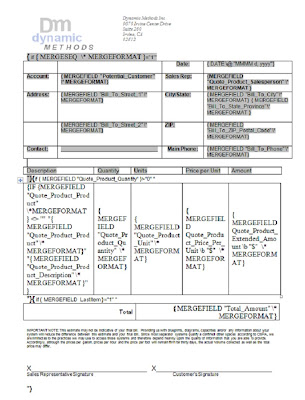
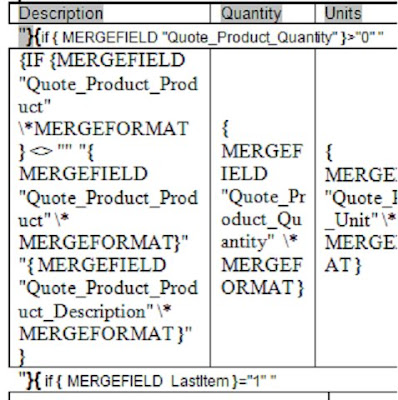
Take note that the table with the fields from the quote line items is inside an IF statement. That IF statement is the key to keeping your line items together.
The last bit of advice I can give is to download the out of the box Mail Merge Quote template and reverse engineer it yourself. Microsoft puts those templates up there not just to show the capabilities or give you a quote that you'll never use, but to see how they did it so you can reproduce it. It doesn't help Microsoft in the least to hold onto that code and not let people figure out how to do what they did. So, check it out and learn all you can from it.
Happy Merging!
David Fronk
Dynamic Methods Inc.
I have tried to explain it but unless you see the code and know how crazy coding in Word can be (at least it seems kind of crazy to me), explaining it in words doesn't do it justice.
So I have tried to do the next best thing and post a screenshot of the code I wrote for the Word Mail Merge Quote that I posted about previously. Please note that I have moved some of the fields around but that was only to help keep everything on one page so that it was easier to see in this screenshot. Also, I made the top table visible instead of hiding all of the table lines so that you can see how the nice straight formatting was accomplished.
I realize that you cannot read anything from the screenshot on the webpage. Please be sure to right click the image and do a Save As onto you desktop. It will look much better.
I hope this helps answer some of the questions I have not been able to fully answer.
Take note that the table with the fields from the quote line items is inside an IF statement. That IF statement is the key to keeping your line items together.
The last bit of advice I can give is to download the out of the box Mail Merge Quote template and reverse engineer it yourself. Microsoft puts those templates up there not just to show the capabilities or give you a quote that you'll never use, but to see how they did it so you can reproduce it. It doesn't help Microsoft in the least to hold onto that code and not let people figure out how to do what they did. So, check it out and learn all you can from it.
Happy Merging!
David Fronk
Dynamic Methods Inc.
Subscribe to:
Posts (Atom)
