I was recently asked about how to search Attachments in MSCRM. I assumed that Advanced Find would be up to the challenge but I had never actually tested it myself.
So, I thought I'd put Advanced Find to the test and I have to say that it did not disappoint. From Advanced Find if you search against Notes (or from whatever entity you want and then search through the related Notes) you can search the following:
File Name - searches the file name of the attachment
File Size - checks the size of the attachment (great for less than/greater than to clean up your DB)
IsDocument - this mostly tells the system whether or not there is an attachment on the Note
Pretty cool. Too bad you can't search in the document but that's a bit out there. And I guess that's what SharePoint is for. Who knows, maybe we'll see this capability show up in later versions (and no this is not included in v4.0, sorry).
David Fronk
Dynamic Methods Inc.
Friday, October 19, 2007


Multiple Lookups to One Entity on the Same Form
Microsoft has finally allowed multiple relationships from one entity to another entity. In MSCRM v3.0 you could only have 1 lookup on a form to any given entity. And if your hands were completely tied when you wanted to create your own relationship between 2 system entities.
This has all changed in MSCRM v4.0. You can create relationships between system entities, custom entities and between system and custom entities. And the greatest part is you can do it as many times as you want. This means you can have as many lookup links to Contact from the Account as you want, or even to Users.
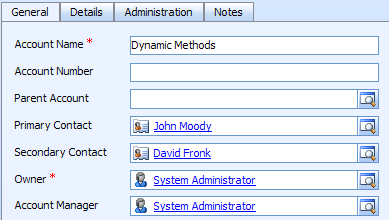
This will create a link for you between the two entities and the best part is that it will reuse the same database. I know that I have helped a number of people copy the user or contact databases with a custom entity in MSCRM v3.0 in order to get around this issue. The solution worked but there were places where things could break and then the two databases could potentially be out of sync. With this new method that Microsoft has provided with out of the box functionality it makes a solution easy and clean.
Now, I have mentioned that you can link multiple User records to the same entity/form. While this is cool please be aware that security is still only run off of the Owner field. Meaning that just because your username is in the "Account Manager" field (a lookup that links to the User entity) that doesn't mean you get to see it. All it is, is a link, that's it. Nothing more.
Having the field on the form is much better than what users of previous versions have had so this is still a very cool improvement in my opinion. Plus with views, Advanced Find, and search capabilities you should be able to get around most of the visiability issues you run into. One other option that you have to help would be to use the new workflow to run some business logic whenever you change a lookup field. Or you could right a plug-in to automatically share the record with the secondary user field(s) so that you can work your way around security. Philip Richardson shows a great use of workflow on a lookup field through his screencast at: http://www.philiprichardson.org/screencasts/titan/BasicWorkflowCTP3/BasicWorkflowCTP3.html. Check it out for some more info on MSCRM v4.0.
I'm so excited for v4.0!
David Fronk
Dynamic Methods Inc.
This has all changed in MSCRM v4.0. You can create relationships between system entities, custom entities and between system and custom entities. And the greatest part is you can do it as many times as you want. This means you can have as many lookup links to Contact from the Account as you want, or even to Users.
This will create a link for you between the two entities and the best part is that it will reuse the same database. I know that I have helped a number of people copy the user or contact databases with a custom entity in MSCRM v3.0 in order to get around this issue. The solution worked but there were places where things could break and then the two databases could potentially be out of sync. With this new method that Microsoft has provided with out of the box functionality it makes a solution easy and clean.
Now, I have mentioned that you can link multiple User records to the same entity/form. While this is cool please be aware that security is still only run off of the Owner field. Meaning that just because your username is in the "Account Manager" field (a lookup that links to the User entity) that doesn't mean you get to see it. All it is, is a link, that's it. Nothing more.
Having the field on the form is much better than what users of previous versions have had so this is still a very cool improvement in my opinion. Plus with views, Advanced Find, and search capabilities you should be able to get around most of the visiability issues you run into. One other option that you have to help would be to use the new workflow to run some business logic whenever you change a lookup field. Or you could right a plug-in to automatically share the record with the secondary user field(s) so that you can work your way around security. Philip Richardson shows a great use of workflow on a lookup field through his screencast at: http://www.philiprichardson.org/screencasts/titan/BasicWorkflowCTP3/BasicWorkflowCTP3.html. Check it out for some more info on MSCRM v4.0.
I'm so excited for v4.0!
David Fronk
Dynamic Methods Inc.
Wednesday, October 10, 2007
Advanced Find Shows Related Columns
Here's a new addition to MSCRM 4.0 that will be really nice for users. You can now add columns from related entities in Advanced Find. So, if you want to see the email of the Primary Contact in the Account list that is now possible. Please be sure to remember that you can add any field on a related entity, custom or system created but please be aware that the related entities will be from the lookup fields (fields with the magnifying glass) on the entity on which you are building your view. So, while I can see the email of the Primary Contact of an Account, I cannot show the email for Contacts in the Account view. Why? Because there will be multiple and the system won't know which one to display. Also, the system is limited to only be able to show one value for each row of a given column.
Just to show you, from Advanced Find, I choose "Edit Columns" and then "Add Columns". I can now click on the entity as a drop down and it will bring up all of the related entities and what field the relationship is through:

I choose "Primary Contact (Contact)" and then check the "Email" column, run my query and I get:

There it is. I'm really excited about this because this need was probably one of the largest requests that I got that turned into an SRS report. SRS reports are great, don't get me wrong, they just can't be maintained or written by typical users and the actions you could take from that report were limited in comparison to what you could do from the CRM grid.
Last thing, since you can do this in Advanced Find logically it would make sense that you could do this in the main System Views for any given entity. Well, that's just what you get. Your System Views that you create for your company can have these types of columns as well.
Did I mention that I'm excited for MSCRM 4.0?
David Fronk
Dynamic Methods Inc.
Just to show you, from Advanced Find, I choose "Edit Columns" and then "Add Columns". I can now click on the entity as a drop down and it will bring up all of the related entities and what field the relationship is through:
I choose "Primary Contact (Contact)" and then check the "Email" column, run my query and I get:
There it is. I'm really excited about this because this need was probably one of the largest requests that I got that turned into an SRS report. SRS reports are great, don't get me wrong, they just can't be maintained or written by typical users and the actions you could take from that report were limited in comparison to what you could do from the CRM grid.
Last thing, since you can do this in Advanced Find logically it would make sense that you could do this in the main System Views for any given entity. Well, that's just what you get. Your System Views that you create for your company can have these types of columns as well.
Did I mention that I'm excited for MSCRM 4.0?
David Fronk
Dynamic Methods Inc.
Mail Merge from Web Client
Mail Merge has been revamped and improved greatly in the new release of MSCRM. Custom fields can now be used in Mail Merges, something that users have been wanting for a long time. The other large improvement is the capability to run a Mail Merge from the web client, not just the Outlook client. What this means is now Mail Merge templates can be stored at the server level and users can utilize company templates or make their own for their needs.
In the Settings area there is now a template section that has the three old templates from before (Articles, Contracts, and Emails) but now there is a Mail Merge Template option.
In the Settings area there is now a template section that has the three old templates from before (Articles, Contracts, and Emails) but now there is a Mail Merge Template option.
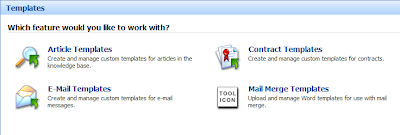
You can create a new Mail Merge template and fill out the following form:
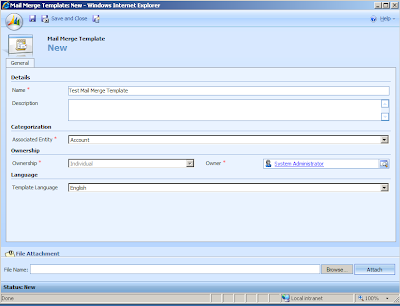
Please note the Associated Entity list. It consists of:
Account
Contact
Lead
Quote
Nothing more as of yet. Maybe future versions, maybe not.
Also, take note of the File Attachment, this is for the Word Document Template that will be utilized to render the template for use. You upload your Word Documents as XML files for your template, attach it and then save the mail merge template form. Once the form is saved you can then choose which data fields to include in the Mail Merge.
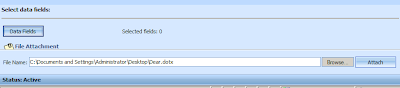
When you click on the "Data Fields" button you can select what fields you want to include in the Mail Merge. Here's what the screen looks like:
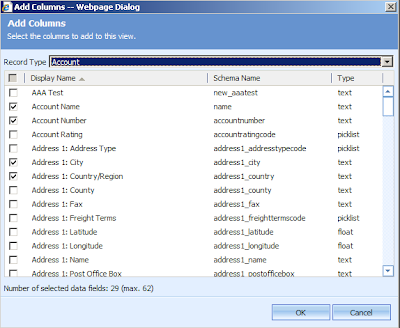
If you look closely you'll see a couple of new capabilities here in this screen. First notice that the first attribute that is available to be selected is "AAA Test" with a schema name of "new_aaatest". Yep, custom fields. You've now seen it with your own eyes. Secondly, take note of the Record Type. Did you see that it's a picklist? Yep, you guessed it, you can pull any field from any related entity. Now I will put a bit of a caveat on my "any field from any related entity" statement. You can pull data from any related entity that is related through a Lookup field (the fields with the magnifying glass). So, from an Account I can pull the Primary Contact's data. There is only one record to pull from so it's clean and simple. However, I cannot pull a field from all related Contacts to a given Account. Having multiple values for one field in a Mail Merge just wouldn't make sense. Also, just so you can see it with your own eyes, here's a screenshot:
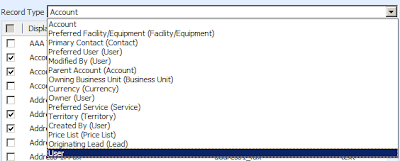
It's actually pretty nice in that it shows the field that is linking the two tables so you know what relationship you are pulling from.
From here on out it's Mail Merge as usual. From a list of Accounts you could then click on the Mail Merge button, choose the template you saved and run the merge.
Needless to say I am very excited about this new functionality and I hope you are too.
I'm so excited for MSCRM 4.0!
David Fronk
Dynamic Methods Inc.
Tuesday, October 02, 2007
Typing in a LOOKUP Field
This is probably my favorite end user addition that has come through to Titan. You can type inside of a lookup field. I can't tell you how many users have requested that whenever I go through training. Microsoft did a great job of dialing this in too. First just put your cursor into the field and you'll see the flashing cursor waiting for you to type in it.

Here I type in "David Fronk" and notice that it is not "hotlinked" yet until I click out of the field.

As soon as I click away, or tab out of the field CRM checks the Contact database to see if what I typed matches any existing contact record. If it finds one, and only one, record then you get the nice blue "hotlinked" name with the contact record.

If however you type in someone that does not exist in the linked database, or if there are duplicates, the system will not know which record to link to and you will get a red X and red hotlink telling you that this is incorrect.
Here I type in "David Fronk" and notice that it is not "hotlinked" yet until I click out of the field.
As soon as I click away, or tab out of the field CRM checks the Contact database to see if what I typed matches any existing contact record. If it finds one, and only one, record then you get the nice blue "hotlinked" name with the contact record.
If however you type in someone that does not exist in the linked database, or if there are duplicates, the system will not know which record to link to and you will get a red X and red hotlink telling you that this is incorrect.

You will then have to check your spelling or pick one of the multiple records that exist in the database so that CRM knows which record to link to.
This works on all lookup fields you come across. Including Product, Unit of Measure, Primary Contact, Parent Customer, etc.
Very nice and easy functionality that will reduce clicks and help people choose which way to fill out the form and hopefully fill out the form faster. Oh, and in case you're wondering about the speed of that check on the field, it's actually really fast. I haven't tested it on a system that has over a million contact records but for the small amount of data I have in the system it flew.
David Fronk
Dynamic Methods Inc.
Titan News
I just found out that the NDA on Titan expired yesterday so now anything about Titan is fair game to talk about, blog and possibly even show off. There are a lot to go over so I will most likely be posting about that for the next little while and possibly more frequently. Some of the big news is DUPLICATE CHECKER, multi-company, multi-currency, the ability to TYPE inside of a LOOKUP field, the use of Forms Authentication, a complete overhaul of the Email Router, Many-to-Many relationships, and did I mention DUPLICATE CHECKER? I think Duplicate Checker was either the most requested enhancement from my clients that I saw or the second most requested. Either way, there are a lot of people who want it and Microsoft has delivered. And just as a little plug for their Duplicate Checker, it's really good. You can check when you create a new record, make custom duplicate check rules, check across entities (check Contacts when adding a new Lead), and run scheduled dup checks of your entire system.
Some very cool things to see in the new version and hopefully I can help you see the new value that has been added.
David Fronk
Dynamic Methods Inc.
Some very cool things to see in the new version and hopefully I can help you see the new value that has been added.
David Fronk
Dynamic Methods Inc.
Friday, September 28, 2007
Determine space available for custom attributes
For anyone who has read the Microsoft CRM Customizations book this SQL script may not be anything new but I saw this script and thought it was really cool. I actually have a client who cannot add any more "bit" attributes to the Contact entity so when I saw this SQL Script I was really excited to see what it told me about the space available on their Contact entity.
Here's the script:
--Run this on the metabase
--space remaining in table
select e.Name, Byte_Remaining = 8060-(sum(a.length))
from entity e join Attribute a on e.entityid = a.entityid
where a.iscustomfield = 1
and a.islogical = 0
group by e.Name
--script to see current size of tables, can't go over 8060
select e.Name, Physical_size = sum(a.length)
from entity e join Attribute a on e.entityid = a.entityid
where a.iscustomfield = 1
and a.islogical = 0
group by e.Name
You don't run out of space very often but if you're afraid of running out then this script may help you out. For my client that cannot add any more "bit" attributes, this script showed that they still had 7000+ bytes available on the table. So, apparently there may be some limit as to the number of attribute types. I haven't found a solution for that piece yet but hopefully I will soon. If anyone has seen this and has figured out a way around the problem I would love to hear it.
I hope this script helps someone out (whether you've read the MSCRM Customizations book or not).
David Fronk
Dynamic Methods Inc.
Here's the script:
--Run this on the metabase
--space remaining in table
select e.Name, Byte_Remaining = 8060-(sum(a.length))
from entity e join Attribute a on e.entityid = a.entityid
where a.iscustomfield = 1
and a.islogical = 0
group by e.Name
--script to see current size of tables, can't go over 8060
select e.Name, Physical_size = sum(a.length)
from entity e join Attribute a on e.entityid = a.entityid
where a.iscustomfield = 1
and a.islogical = 0
group by e.Name
You don't run out of space very often but if you're afraid of running out then this script may help you out. For my client that cannot add any more "bit" attributes, this script showed that they still had 7000+ bytes available on the table. So, apparently there may be some limit as to the number of attribute types. I haven't found a solution for that piece yet but hopefully I will soon. If anyone has seen this and has figured out a way around the problem I would love to hear it.
I hope this script helps someone out (whether you've read the MSCRM Customizations book or not).
David Fronk
Dynamic Methods Inc.
Subscribe to:
Posts (Atom)
